

Where To Mail 1099 NEC to IRS: A Complete Resource
 By
James Wilson
By
James Wilson If you’re a business owner, knowing where to mail 1099 NEC to IRS for the tax year can be confusing. The IRS lets you file these forms electronically; however, many still file on paper. If you get the address or protocols wrong, it could lead to delays or troubles down the road.
However, the fundamentals of the payee income disclosure remain unchanged. Businesses still use Form 1099-NEC to report nonemployee compensation for the tax year.
This guide explains everything you need to know about the 1099-NEC form. Many independent workers also keep simple payment records through a pay stub generator. It helps them organize their pay information more easily.
- What Is a 1099-NEC Form?
- How Do I Get a Form 1099-NEC?
- How To Send a 1099-NEC to Your Independent Contractor
- Where To Mail 1099 NEC to IRS and Which IRS Mailing Address To Use
- Advantages of Filing 1099 NEC Electronically Over Paper Filing
- Difference Between Form 1099-NEC and Form 1099-MISC
- How to E-File Form 1099-NEC
- What To Expect After You File Form 1099-NEC
- Final Thoughts
What Is a 1099-NEC Form?
Form 1099-NEC is an Internal Revenue Service form. It reports compensation paid to independent contractors. Businesses are required to send a Form 1099-NEC to independent contractors who are not employees of the company. You must issue Form 1099 NEC if you paid an independent contractor $600 or more in the tax year.
The 1099-NEC form shows the total income and amount of nonemployee compensation you paid in the previous tax year. It shows federal income tax withheld if backup withholding is applied. However, self-employment tax, including Medicare taxes, is not shown on Form 1099-NEC.
The 1099 NEC draft helps the IRS match the taxable income of independent contractors on their tax returns with what the company reported.
For clearer bookkeeping, many independent workers also make a pay stub for each contractor payment. Hence, both parties can maintain accurate year-end records.
How Do I Get a Form 1099-NEC?
There are two ways to obtain the Form 1099-NEC to fill out.
1. Order Paper Copies
If you prefer the manual method, you can place a 1099 NEC forms order online from the IRS website. The official printed version of Copy A is scannable, and Copy B and other copies of the form can be downloaded and printed for use. You can also buy official scannable forms from many offline supply stores.
2. Online
If you decide to fill out the form online, you can use the e-filing provider to do this. You have to fill out the copies online and file them online.
Furthermore, it is essential to note that you cannot print copy A from the PDF.
How To Send a 1099-NEC to Your Independent Contractor
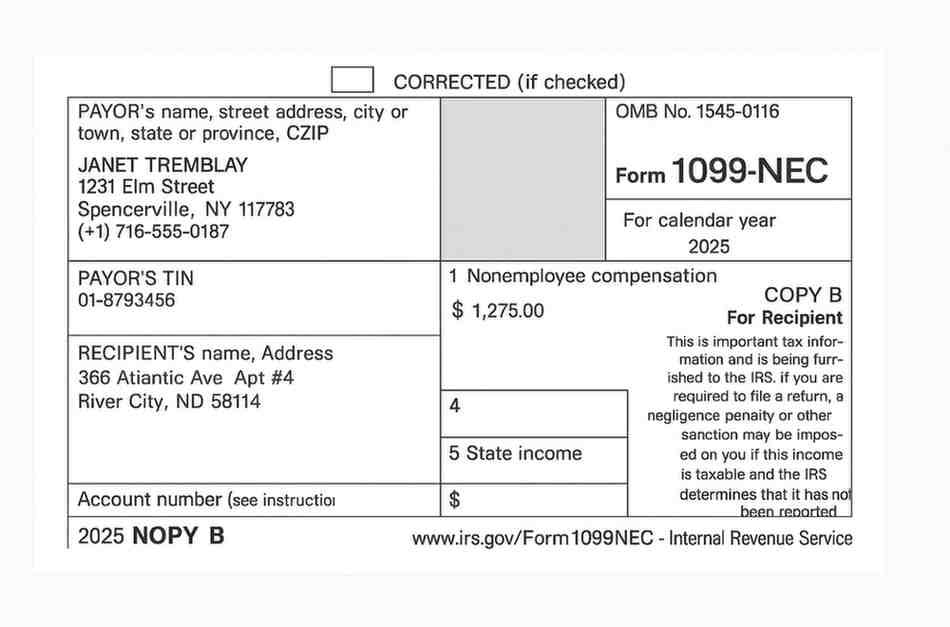
There are specific processes to follow when filling out paper copies before they are sent to the payee. Below is a breakdown of the process to follow.
-
You’ll have to prepare a copy B of the original form for each independent contractor for the tax year. This copy must be postmarked before January 31st, each year. However, if Jan 31st falls on a weekend or legal holiday, the deadline moves to the next business day. Also, the IRS deadline for sending Copy A and Form 1099 is January 31st.
-
Prepare the necessary information. Take into account the payee’s legal name, address, and Taxpayer Identification Number (TIN) or Social Security Number. This is similar to how you report employee information on payroll forms.
-
Complete the form with your principal business details and the total cost of nonemployee compensation you paid.
Once the form is filled out, the next step is to print out Copy B on regular 8.5” x 11” paper. Also, if you file paper with the IRS, you must use official scannable Copy A forms. You cannot file by mailing a plain printed Copy A generated from a downloaded PDF.
Send the form using First-Class Mail. Also, confirm where to send 1099 NEC forms before mailing. Keep extra copies, like Copy C, for your records for at least three to four years.
However, if you file 1099-NEC forms on paper, you must include Form 1096 as the transmittal summary. Also, contractors must receive Copy B by January 31st. Electronic delivery also requires consent.
Where To Mail 1099 NEC to IRS and Which IRS Mailing Address To Use
If you are more comfortable with manual report payments, ensure you mail the 1099-NEC to the correct address. The IRS should receive your Form 1099 NEC at the location that is assigned to your legal home or your principal business.
1099 NEC mailing service depends on whether you are enclosing a check or not. To enclose a check means to owe backup withholding or tax payments. Your 1099 mailing address also depends on your state of residence.
Principal businesses in most states send their forms to the Austin Submission Processing Center in Texas. The address is: Internal Revenue Service, P.O. Box 149213, Austin, TX 73301. These states are Alabama, Arizona, Arkansas, Delaware, Florida, Georgia, and Kentucky. It also includes Maine, Massachusetts, Mississippi, New Hampshire, New Jersey, and New Mexico. Others are New York, North Carolina, Ohio, Texas, Vermont, and Virginia.
If you stay in Alaska, Colorado, Hawaii, Idaho, Illinois, or Indiana, you can send your 1099-NEC to the Department of the Treasury, Internal Revenue Service Center, P.O. Box 219256, Kansas City, MO 64121-9256.
You can also send the form to this address if you stay in Iowa, Kansas, Michigan, Minnesota, Missouri, Montana, Nebraska, or Nevada. This also includes North Dakota, Oklahoma, Oregon, South Carolina, South Dakota, Tennessee, Utah, Washington, Wisconsin, and Wyoming.
Lastly, for states like California, Connecticut, District of Columbia, Louisiana, Maryland, Pennsylvania, Rhode Island and West Virginia. Send your forms to the Department of the Treasury, Internal Revenue Service Center, 1973 North Rulon White Blvd., Ogden, UT 84201.
It is essential to note that the addresses change frequently, so ensure to double-check where to send 1099 NEC forms before submitting. Hence, you should always verify the correct IRS mailing address using the IRS's "where to find" table.
Advantages of Filing 1099 NEC Electronically Over Paper Filing
Electronic filing ensures that all such payments for the tax year are submitted accurately and efficiently. In fact, the IRS encourages business owners to use electronic filing to report payments. In situations where you have 10 or more information returns of any type to file, electronic filing is mandatory.
Usually, electronic filing through the authorized software does not incur IRS fees. The IRS offers free e-file options; however, third-party providers may charge you. The built-in checks also help to locate common errors. The IRS will be the first one to confirm your electronic filing when it receives your submission.
With paper filing, you can order official IRS forms and fill them out by hand or using a printer. You also purchase postage and mail the paper. This is clearly a slower IRS process, and there is a higher probability of data-entry errors.
Difference Between Form 1099-NEC and Form 1099-MISC
In some instances, business owners must issue Form 1099-NEC along with a Form 1099-MISC to the same contractor. This happens when the contractor receives payments that belong in both categories.
The major difference between the two forms is in the kind of payments made and the deadlines. Form 1099-NEC is used only for nonemployee compensation. On the other hand, Form 1099-MISC is used for other payments. These include rents, royalties, prizes, and other miscellaneous income.
How to E-File Form 1099-NEC
Filing Form 1099-NEC electronically is straightforward. Businesses can’t send info directly to the IRS website. You need to set up an IRIS (Information Returns Intake System) Transmitter account. Enter the necessary information manually or upload an XML file that meets IRS criteria.
Also, ensure the payer information and your own account details are accurate and up to date. Enter the money figures and double-check for errors. If everything is in order, send the form before the deadline.
Once it is done, keep a copy of your filing confirmation along with the organization’s other records. The same procedure applies when using certified third-party software.
What To Expect After You File Form 1099-NEC
After submitting a 1099 form to the IRS, it is essential to know what comes next. First, the IRS verifies whether the reported payments match the contractor's income for the tax year. According to the IRS, each payment must be deposited into the correct box so that the IRS can cross-reference it properly.
Filing a Form 1099-NEC does not create a tax obligation for your business, employer, or Social Security. The Schedule C income triggers self-employment. Independent contractors are required to pay their Medicare taxes and other self-employment taxes.
The IRS usually processes and accepts the form within a few days if you filed electronically. However, paper filing can take months. If you filed the form late or used an incorrect TIN, penalties may apply.
On the other hand, for the independent contractor, the 1099 ensures that all taxable income is reported accurately to the IRS. This helps you avoid penalties or notices. If it is missing from their income, they can get a notice from the IRS and face penalties or interest.
If there is an IRS penalty notice, review it promptly. You may have had a reasonable cause to be late. For example, natural disasters, serious illnesses, or system errors.
Thus, the recipient could apply for penalty relief in that situation. If not, be very careful with the due dates and ask for extensions when needed. The IRS does not offer an automatic extension for Form 1099 NEC. However, extension requests exist through Form 8809. Though the IRS rarely grants them for 1099 NEC, the typical rule is to file by January 31.
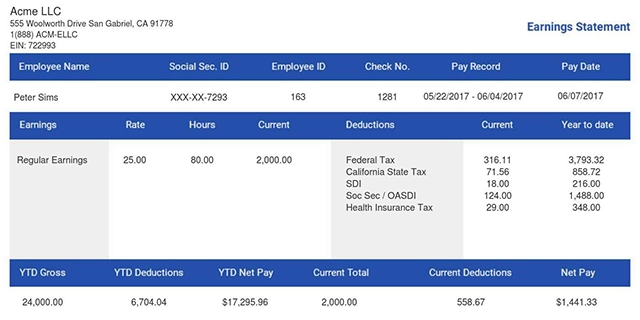
To keep payment records simple and accurate, consider using the 123 Paystub method. It helps create ready-to-print pay stubs that support your 1099-NEC reporting in just three steps.
Final Thoughts
It is simpler to manage Form 1099-NEC if you are aware of the regulations. If you are filing by paper, ensure you have the correct 1099-NEC mailing address. The IRS promotes e-file as it is time-saving and error-free. However, following the proper steps will help you stay on course, protect your business, and meet the tax obligations. Even small filing mistakes can create delays. Hence, keep your documents clean and accurate so that the entire process runs smoothly and easily.
You can create ready-to-print 1099 NEC forms instantly with our tool. And if you also need clean payment records for the tax year, you can easily create a pay stub using our Paystub maker.
- 1. Enter Your Information

- 2. Select Your Favorite Theme

- 3. Download Your Stub!

 By
By